Eyeglasses Guides
How to Read an Eye Prescription Before Buying Glasses Online


A glasses order can move fast until the prescription page appears. Acronyms like OD, OS, SPH, CYL, Axis, ADD, and PD may look like complex code, but each field serves a highly specific purpose. Learning how to read your eye prescription details empowers you to enter the correct values when buying glasses online, ensuring your new lenses perfectly match your daily vision needs.
Main Eye Prescription Terms at a Glance
An eye prescription lists the exact optical values required to manufacture your custom lenses. While the physical layout of the document can vary by doctor, most eyeglass prescriptions share a universal set of terms.
The table below provides a quick overview to help you understand these metrics before inputting them online.
Term | Full Name | What It Means | Where It Usually Goes Online |
|---|---|---|---|
OD | Oculus Dexter | Right eye | Right eye prescription row |
OS | Oculus Sinister | Left eye | Left eye prescription row |
SPH | Sphere | Main lens power | SPH or Sphere field |
CYL | Cylinder | Astigmatism power | CYL or Cylinder field |
Axis | Axis | Direction of astigmatism correction | Axis field |
ADD | Addition | Extra near power | ADD field for reading, bifocal, or progressive lenses |
PD | Pupillary Distance | Distance between pupil centers | PD, single PD, or dual PD field |
Prism | Eye alignment correction | Prism fields (if listed) |
These crucial terms ensure the optical lab places the exact corrective power in the appropriate lens.
Some prescriptions also include distinct labels such as distance, near, intermediate, or computer. These labels are important because they indicate the intended focal purpose of the glasses. A distance prescription is typically used for everyday far vision, while a near prescription is reserved for reading. An intermediate or computer prescription is meticulously optimized for digital screen distances.

What SPH, CYL, and Axis Mean
SPH, CYL, and Axis are frequently the primary values people look for, as they directly populate the main prescription fields on any online glasses order form.
SPH, or sphere, dictates the fundamental lens power required to correct nearsightedness or farsightedness. Nearsightedness, also scientifically called myopia, means distant objects appear blurry. Farsightedness, or hyperopia, indicates that close objects are harder for the eyes to focus on.
SPH measurements will always appear with either a plus (+) or minus (-) sign attached.
A minus sign indicates nearsighted correction.
A plus sign indicates farsighted correction.
A number farther from zero represents a stronger lens power.
Plano or 0.00 means no spherical power is required for that particular eye.
For example, an SPH of -2.00 is fundamentally different from an SPH of +2.00. While the numerical value looks similar, the sign reverses the entire direction of the lens correction.
CYL, or cylinder, measures astigmatism. Astigmatism occurs when the eye has an uneven curvature that negatively affects how light focuses. If your prescription doctor includes a CYL value, it must be entered into the cylinder field.
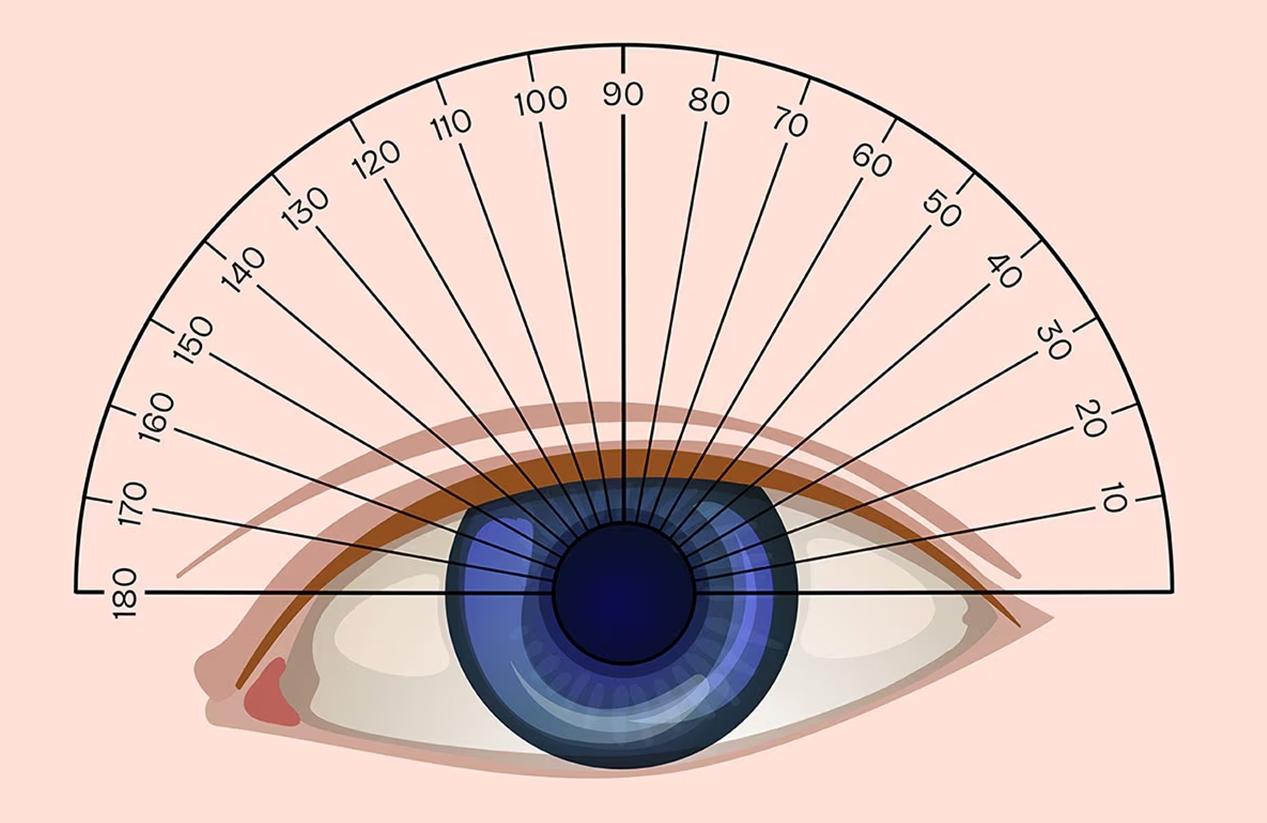
Axis works directly with the CYL value. It shows the exact degree and direction of the astigmatism correction, written as a number from 1 to 180. Axis does not represent lens strength; instead, it acts as a compass, telling the optical lab exactly where to align the CYL correction.
Here is a simple online entry example:
Prescription Line | How to Enter It |
|---|---|
OD: SPH -2.00, CYL -0.50, Axis 180 | Input -2.00 in the right eye SPH, -0.50 in the right eye CYL, and 180 in the right eye Axis. |
OS: SPH -1.75, CYL blank, Axis blank | Input -1.75 in the left eye SPH, and strictly leave CYL and Axis blank if the form permits. |
Adopting this line-by-line matching technique helps prevent the most frequent SPH, CYL, and Axis data entry errors. As a rule of thumb: if a CYL value is listed, an Axis value is absolutely required. Conversely, if the CYL field is blank, the Axis field should remain blank.
What OD, OS, ADD, and PD Mean
OD, OS, ADD, and PD ensure that online order forms route your specific prescription values to the correct eye and optical position within the frame.
OD stands for the right eye, originating from the Latin term Oculus Dexter. OS stands for the left eye, derived from Oculus Sinister. Occasionally, modern prescriptions may simplify this by using RE for Right Eye and LE for Left Eye.
The OD and OS distinction is critical because your right and left eyes rarely have identical vision needs. When entering prescription details online, keep the right eye row and left eye row strictly separated.
ADD, or addition, represents the supplementary near power used for reading, bifocal, or progressive glasses. Progressive lenses are advanced multifocal lenses that seamlessly support multiple viewing distances without visible dividing lines across the glass. ADD is universally written as a plus number, such as +1.50 or +2.00.
You should never type the ADD value into the SPH field unless the ordering process explicitly instructs you to combine values. Most reliable online forms provide an isolated ADD dropdown menu.
PD, or pupillary distance, represents the distance in millimeters between the centers of your pupils. It accurately positions the optical center of each lens perfectly in front of your eyes.
PD can appear in two standard formats:
Single PD: One total measurement, such as 62 mm.
Dual PD: Two separate measurements, such as 31/31 or 30/32.
If an online form requests a single PD, provide the total number. If it requires a dual PD, enter the right and left values independently. Do not arbitrarily add dual PD numbers together unless the website explicitly asks for a single metric.
Be aware that PD may not appear on every prescription printout. If it is missing, utilize an online measuring tool provided by the retailer, or contact your eye care provider to obtain the exact figure.
How to Check Your Prescription Before Ordering Glasses Online
Before ordering glasses online, treat your physical prescription page as a rigorous checkout checklist. The objective is not just to read the document, but to meticulously map each metric into the correct digital field.
First, verify that your document is specifically an eyeglass prescription. A contact lens prescription contains vastly different parameters because contact lenses sit directly on the cornea, while glasses sit slightly away from the face.
Next, check the document's date. A current, unexpired eyeglass prescription guarantees the clearest vision possible. If you notice recent vision changes or your prescription has expired, professionally schedule a new eye exam before proceeding.
Finally, decide whether you will upload an image of the prescription or manually key in the data.
If you choose to upload a prescription photo, confirm that:
The image is sharply focused and completely uncropped.
Both the OD and OS rows are clearly visible.
Every SPH, CYL, Axis, ADD, and PD number is legible.
The exam date and expiration date are included.
Any specific doctor's notes or recommendations are clearly shown.
If you prefer to enter the values manually, rigorously ensure that:
OD values are placed exactly in the right eye row.
OS values are placed exactly in the left eye row.
Plus and minus symbols perfectly match the physical document.
CYL and Axis are entered together whenever they are listed.
ADD is securely entered only into the dedicated ADD field.
The PD format chosen matches what the website form demands.
The selected lens type perfectly matches your intended daily use.
Lens purpose is an incredibly crucial check. Distance, reading, computer, and progressive prescriptions require distinctly different lens designs. Always match the online order type to the prescription's core purpose before finalizing your lenses.
When purchasing prescription glasses online, the safest method is simple: read one line, enter one line, and thoroughly compare the digital shopping cart with your original paper document before paying.
Common Prescription Entry Mistakes to Avoid
Most prescription entry errors are subtle, yet they severely impact how accurately your new lenses function. Prevent eye strain by reviewing and correcting these common issues prior to checkout.
Switching OD and OS: OD represents the right eye, and OS is the left eye. Entering OD values in the left row will make the glasses unwearable.
Missing the plus or minus sign: SPH -1.50 and SPH +1.50 yield entirely different visual corrections. Copy every symbol meticulously.
Entering CYL without Axis: CYL and Axis operate together to correct astigmatism. If CYL is present, the corresponding Axis value must be inputted.
Putting ADD in the wrong field: ADD strictly provides near-vision power for reading or multifocal lenses. Never submit ADD as an SPH measurement.
Mixing up Single PD and Dual PD: Single PD represents one total width, whereas dual PD isolates the distance per eye. Align your numbers with the exact field the order page requests.
Using a contact lens prescription: Eyeglasses require completely distinct optical measurements. Always ensure you are using a dedicated eyeglass prescription.
Before hitting the purchase button, contrast every digital entry against the original document from top to bottom. Careful and methodical entry guarantees your final lenses replicate your prescription flawlessly.
Enter Your Prescription and Choose Glasses with Confidence
Buying glasses online is a highly rewarding experience once the technical prescription fields make sense. Take a moment to verify your OD, OS, SPH, CYL, Axis, ADD, and PD metrics before selecting your ideal frame. By relying on a current eyeglass prescription, matching every value to its proper field, and thoroughly reviewing your order, you guarantee your new eyewear will exceptionally support your daily vision needs.
FAQs about Eye Prescriptions
Q1. Is an Eye Prescription the Same as a Glasses Prescription?
Generally, yes. When consumers discuss an "eye prescription" for buying glasses, they are referring to a standardized eyeglass prescription. This document contains all the structural lens values necessary for framed eyewear. A contact lens prescription features entirely different base curves and diameters, making it invalid for online glasses orders.
Q2. Can I Buy Glasses Online If My Prescription Has No PD?
Yes, you can still place an order, but a precise PD (Pupillary Distance) is heavily required to center the prescription lenses correctly. Many reputable eyewear retailers provide an online PD measuring tool, or you can request this specific number directly from your optometrist. Always rely on an accurate measurement rather than guessing.
Q3. Why Are SPH, CYL, and Axis Important for Online Glasses?
SPH, CYL, and Axis explicitly instruct the optical lab on how to craft your main vision correction. SPH provides the overarching spherical lens power, while CYL and Axis collaborate to correct astigmatism angles. Entering these three fields accurately is absolutely non-negotiable for achieving crystal-clear vision.
Q4. What If My OD and OS Prescription Values Are Different?
This is extremely common. The vast majority of people have slightly different vision correction needs for their right and left eyes. Simply input the OD values into the right eye row and the OS values into the left eye row to guarantee each lens is custom-engineered for the correct eye.